Resolving Connectivity Issues
To resolve issues when registering or getting AggFlow DM updates follow these instructions:
99.9% of connectivity issues are related to firewall settings on the computer and/or corporate network. Verify that firewall(s) allow connectivity to www.aggflow.com.
Typical Error Messages
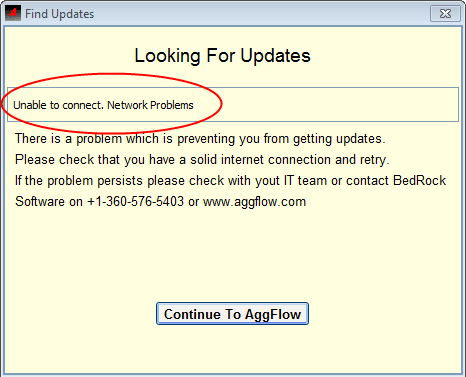
Here is an example of an AggFlow DM Update window notifying of a connectivity issue.
Other possible messages include:
- Unable to connect. Peer Communications Error
- Unable to connect. Referent inaccessible
- Unable to connect. Time out connection ...
- Unable to connect. Wrong proxy-authenticate information.
Fix Internet Settings
To resolve the connectivity issue, allow AggFlow to load the proper settings automatically.
-
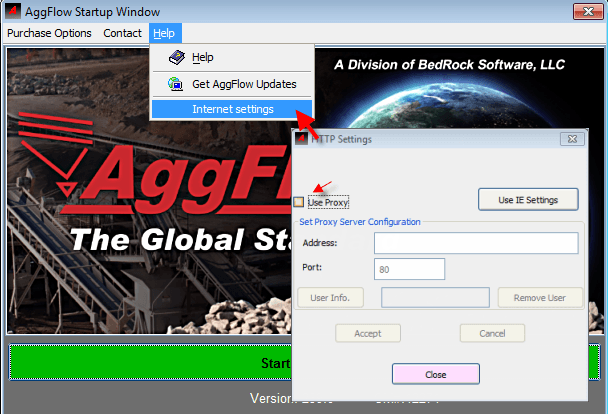
Open the Internet Settings window:
In the AggFlow DM Start-up window select
Help, thenInternet Settings.OR
From the AggFlow DM program, select
Help, thenAbout.
From theAboutwindow selectHelp, thenInternet Settings. -
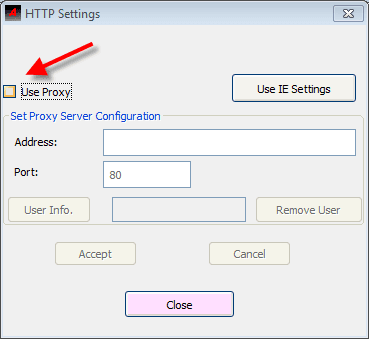
Select the
Use IE Settingsbutton.AggFlow DM will read the computer’s internet settings and load them for use. The settings will appear into the proxy server address field.
-
Check the
Use Proxybox.AggFlow DM will now be able to use the established proxy settings for connections.
-
Select
Acceptto install the settings.
The computer should now be able to receive AggFlow DM updates and new program downloads. If a problem persists please request assistance from your company's Information Technology (IT) team to resolve the issue.
Getting Help from IT Team
Provide this critical information to the company Information Technology (IT) Team:
AggFlow DM Product Information
Created by BedRock Software. Inc., AggFlow DM is a software program that is used to model and optimize aggregate plant simulations. AggFlow DM is a dynamic program that requires regular program/database updates, license verification, and user registration. As such, it is critical for the AggFlow program to communicate with the AggFlow DM server regularly.
To Resolve AggFlow DM Connectivity Issues
AggFlow DM requires connectivity to these ports for all communications and downloads:
- For updates HTTP access to:
*.aggflow.com, port: 80. - For communication & downloads HTTPS access to:
*.aggflow.com, port: 443.
Alternative Option
Simply grant AggFlow DM server access by adding this web address to the company’s AUTHORIZED list: *.aggflow.com
This will allow direct connection without filtering. In this case the proxy server settings are not required and should be removed (unchecked) from the Internet Settings Window.
BedRock Support Contact Information
Please do not hesitate to contact the AggFlow DM Support Team directly for help or questions.
- Phone: +1-360-576-5403 (USA)
- Email: support@aggflow.com