Starting AggFlow DM
AggFlow DM is started by clicking on the green AggFlow DM Icon to open the startup window and log into the program. . Login to AggFlow DM opens the control panel.
There is no need for a USB key (Dongle) when working online. If you have a licensed USB program, inserting the key when starting the program will match the license to the AggFlow DM program.
Startup Window
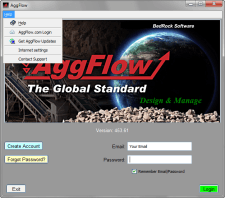
When you start AggFlow DM, the startup window will appear. This is where you will log in to the program with your email and password which is the same email and password to logon to the AggFlow DM website. If this is the first time using the program, then an account will need to be created by selecting the create account button. If there is already an email with this account, then the password can be set to be registered to the email. In order to add an email for a login or to change a password, email verification will be required.
There is a Help menu option available, which can be used to access the website, check for and accept program updates, and change proxy settings to access the internet when there are restrictions to access.
The version of the program is also shown, ensure that the latest version is being used by checking and installing updates to the program.
Access to the AggFlow DM worksheet for your projects is controlled by you as the owner to your projects. As the Owner, you can manage access to other users of AggFlow DM through the manage users feature in the control panel. It is the same control panel for all types of users and projects.
Users can be invited to the project with edit, modify or read only access.
Shortcuts
- Name
Alt + underscored letter- Description
- Opens that menu selection
- Name
F1- Description
- Help Menu
- Name
F3- Description
- Search projects in the control panel
- Name
F5- Description
- Runs the simulation in the worksheet
- Name
Ctrl + F5- Description
- Runs the simulation for a stage
- Name
Alt + Scroll- Description
- Scroll worksheet left to right
- Name
F10- Description
- (In Control Panel) Change the background color