Mobile Equipment
The following types of Mobile Equipment are available. Mobile equipment with crushers and screens can be selected from the crusher type, and mobile washing equipment is selected from the wash equipment items.
Tips for Working with Mobile

Jaws
Place track-mounted equipment on the worksheet exactly the same as other equipment. Learn More: Select and Place Equipment.

Cones
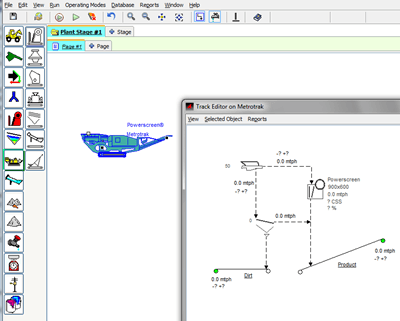
To open and review the specific components on the track-mounted machine, place the icon on the worksheet and double-click it. Or right-click and select
Adjust Componentson the short-cut menu. Also useAdjust Setupoption to adjust Limits, Power, Cost and Emissions for the machine.
HSI
In the Track Editor window, select any individual component (it will turn blue) then right-click and select
Adjust Setupto make changes.
VSI
The Track Editor window must be closed before any other operation can be performed.

Screens
If any piece of equipment on the track-mounted machine “red flags” (needs adjustment or exceeds limits) the Track-Mounted icon turns red. Open the Track Editor window to make necessary adjustments.

Wash
Monitors can be selected and are shown on the Track editor for each component. Selective monitors can also be shown on the version worksheet.

Conveyor
Installing Track-Mounted Equipment and Selecting Model

Track Editor Window (Right-click on Individual Components to Adjust Setup)