Reports and Printing
Use the Reports menu to summarize and review equipment settings, input/output gradations and emissions calculations.
Use Reports to:
- Create a summary report for one piece of equipment, a selection of equipment, or the entire worksheet.
- Review the results on screen, print the report or create a PDF document.
- When the report is created, it can be Exported as text, into Excel, printed directly, or Exported to PDF.
To select multiple items on the worksheet, press and hold the
Shift key while clicking each successive item. Or “window” multiple items at once (click on the worksheet and drag the box). The reports can be created for the selected equipment.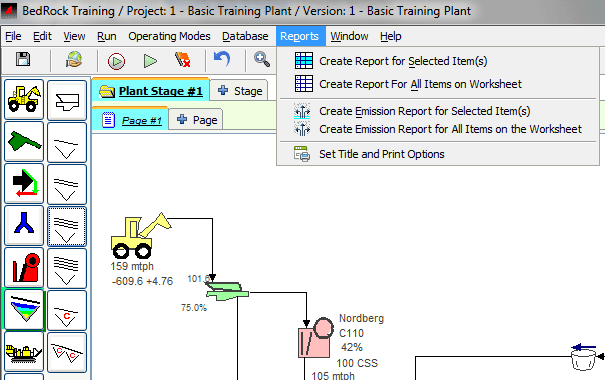
Export to PDF, JPEG, or TIFF
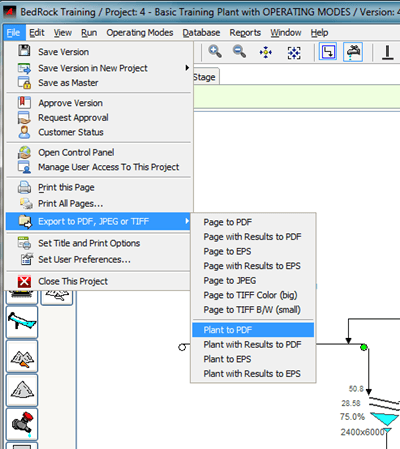
Use the FILE Export option to create PDF summary reports and presentations.
- Select the File menu.
- Choose Export to PDF, JPEG or TIFF.
- Select the desired option
Page / Plant to PDF / EPS / JPEG- Create a PDF / EPS (Encapsulated PostScript) version of the AggFlow DM worksheet using Adobe Acrobat.
Page / Plant with results to PDF / EPS- Create a multi-page PDF that includes the worksheet and reports on each piece of selected equipment in the worksheet.
Page to JPEG- Create a JPEG image of the worksheet. This format is useful for inserting the JPEG into other documents or presentations.
Plant to TIFF (big)- Create a color version of the worksheet in the TIFF image format. This format is useful for inserting the TIFF into other documents or presentations.
Plant to TIFF b/w (small)- Create a black and white version of the worksheet in the TIFF image format. Black and White files require significantly less memory than color versions.
To select more than one piece of equipment in the worksheet, hold down the shift key then select all the equipment items to be included in the report.
Set Title and Print Options
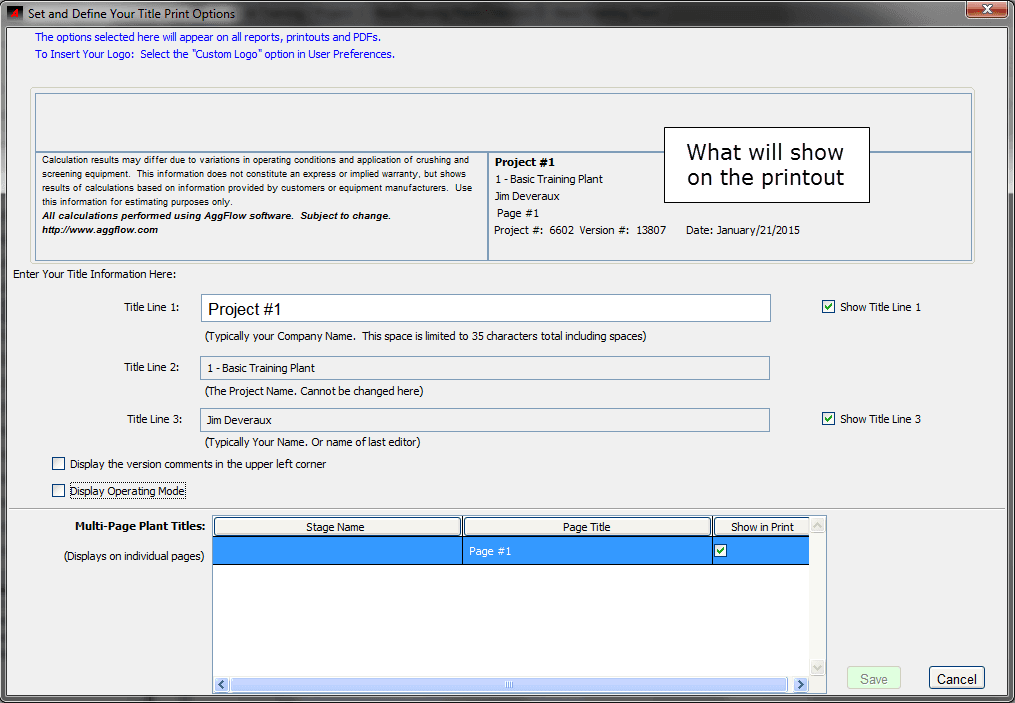
Use the Title and Print Options window to define print options, page titles and default settings for print-outs. Review the options and follow the instructions to establish the print preferences. Title and Print Options can be accessed under the menu drop downs File and Reports
Use the Title and Print Options window to define print options, page titles and default settings for print-outs. Review the options and follow the instructions to establish the print preferences. Title and Print Options can be accessed under the menu drop downs File and Reports