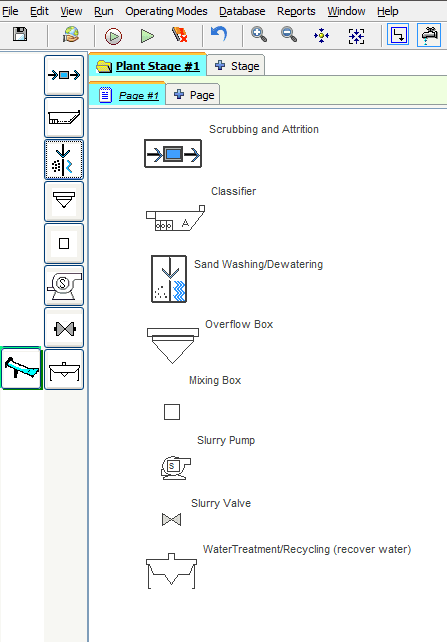
Wash Equipment
AggFlow DM contains many unique wash calculation features. These features have been developed to provide complete plant flow calculations.
Use the Model Browser to review the entire Wash Equipment database and select the appropriate piece of equipment.
Wash Equipment Categories

Scrubbing and Attrition
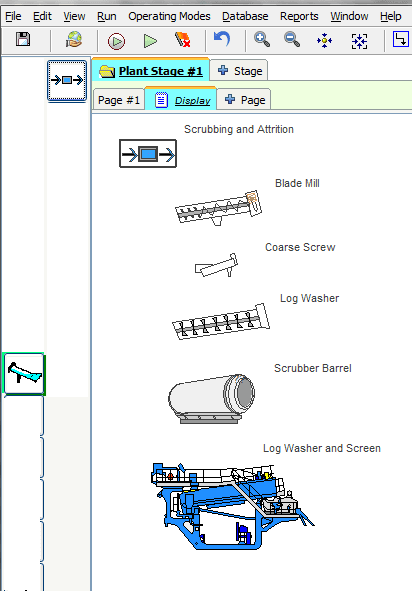
Blade Mill, Coarse Screw, Log Washer, Scrubber Barrel and Mobile units/Plants

Classification
Sand Classification tanks

Sand Washing/Dewatering
Bucket Wheel, Compact Sand Plants, Cyclone, Dense Medium Seperator, Dewatering Screen, Hydrosizer, Sand Sump, Sieve Bend, Sand Screws

Water Treatment/Recycling
Belt Filter Press, Retention Ponds, Silt Thickeners, Plate Frame Press

Overflow Box
Used to set a maximum discharge rate in the underflow with excess material passed to the overflow. Gradation in the underflow and the overflow will be the same.

Mixing Box
Used to add water to the material flow.

Slurry Pump
Used to show pumps in the system. All material will pass through a pump.

Slurry Valve
Used to show location of valves. All material will pass through a valve.
Coarse Screws, Log Washers, Mobile Units, Classifiers, Compact Sand Plants, Dewatering Screens, Sand Screws, and Silt Thickeners have manufacturer specific selections in the model browser and are identified by the manufacturer name and model/description.
To Install Wash Equipment
- Select the wash equipment category.
- Select an individual piece of equipment and place it on the worksheet.
- Right-click and click on
Select Modelto select the equipment model from the Model Browser and Scroll through the database to find the specific piece of equipment desired. Use the plus sign+to expand the categories. The equipment image that will be on the worksheet will display in the model browser. - Choose
Install. If theInstallbutton is not functional, make sure to select an individual piece of equipment (not a manufacturer or sub-category) on the list.
Important: Wash equipment can be set up to add and manage water with the material flow. Water balance calculations will be performed and can be displayed with the monitors and in the setup and results windows and reports. Water will only show in flow streams and product if there is material flow.
Convert Flow Streams to Slurry Pipes
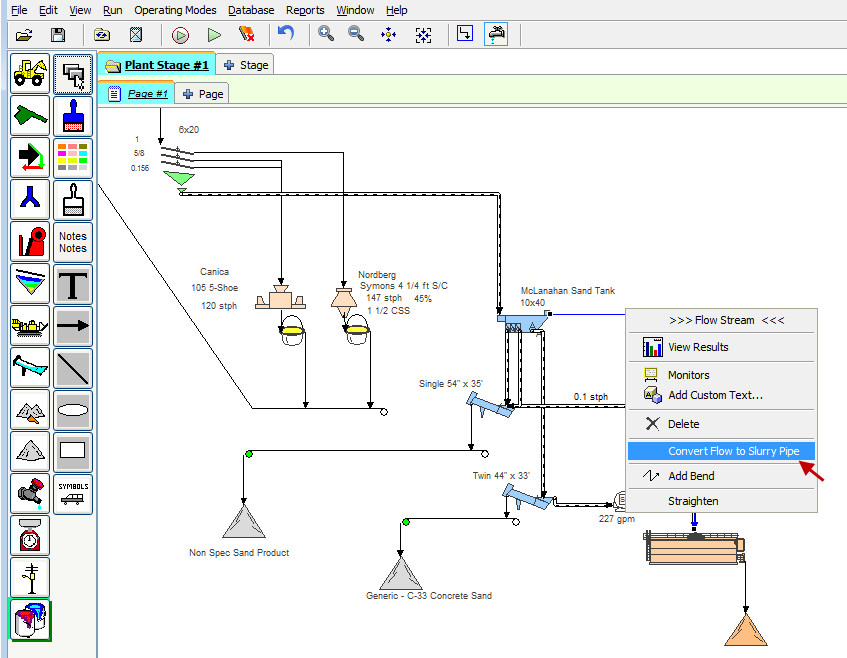
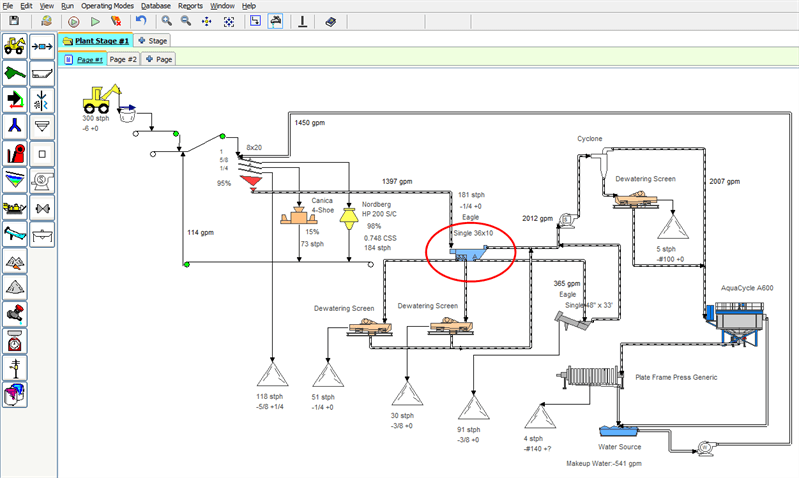
In AggFlow DM, slurry pipes are represented by two lines with a dashed line in the middle. Any flow stream can be converted to a slurry pipe and vice versa.
To Convert Flow Streams to Slurry Pipes
- Select the flow stream to modify.
- Right-click and select
Convert Flow to Slurry Pipe. - Use the right-click menu to select
Monitors,View Resultsor to convert a slurry pipe back to a flow stream.
Use View Results to view tables, charts, and settings for the selected water source or to establish default data options for the water source. AggFlow DM retains the options selected and includes them in reports.
Scrubbing and Attrition
Scrubbing and Attrition Equipment items is equipment that is used to clean coarse aggregates. Water is added to the equipment and the equipment uses a scrubbing action to break down clays and deleterious materials which are carried off in the overflow water.Scrubbing and Attrition equipment includes the following equipment items:
- Blade Mill (Generic)
- Coarse Screw (by manufacturer)
- Log Washer (by manufacturer)
- Scrubber Barrel (Generic)
- Mobile Units (by manufacturer)
Important Notes about Scrubbing and Attrition Equipment
- Typically, this equipment handles material from 3/8" -to- 2 1/2" (10mm –to- 63mm).
- When using this equipment in a flow stream, it is important to track and adjust for water overflow. It is possible to adjust the amount of water added to the material at a fixed rate.
- This equipment typically “floats” out fine material at a 16 mesh split. However, since the normal size ranges for coarse material is above 3/8" (10mm), AggFlow does not track the fines in the overflow stream.
- Therefore, in the program calculations, AggFlow simply passes 100% of the incoming rock through the log washer and the coarse screw.
- AggFlow will track the water in the product and in the overflow stream to perform water balance calculations.
To Adjust Scrubbing and Attrition Equipment
- Select the equipment on the worksheet (it will turn blue).
- Right-click and select
Adjust Setupfrom the short-cut menu. - Make necessary adjustments to simulate the equipment properly including adjusting water for water balance calculations
- Review the data available on the Input, Output and Overflow tabs. When the simulation has been run, the water balance calculation will be completed and will be shown in the tabs.
- Use the Power tab to record and track details of the machine.
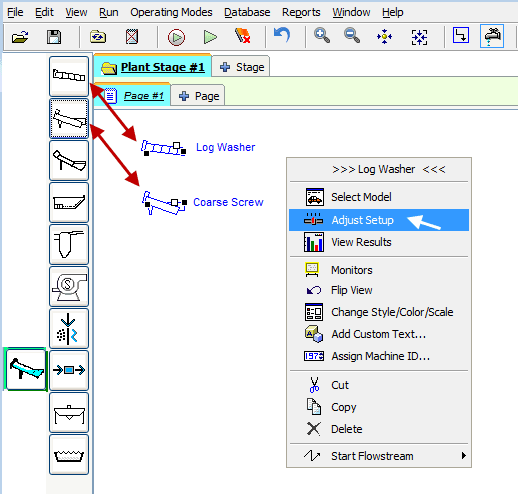
Scrubbing and Attrition Adjustment Options
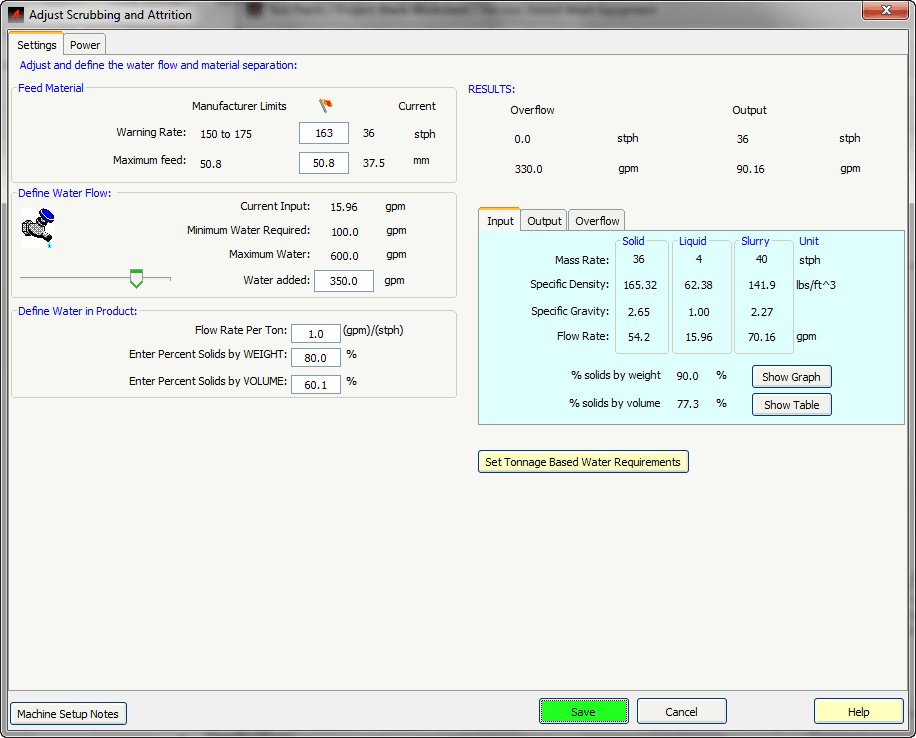
Feed Material
Adjust warning rates for selected equipment. Manufacturer rates will be shown if equiment was selected by manufacturer.
Define Water Flow
Define how much water will be added to the process.
Current Input: Water entering with the input materialWater Added: Enter the additional water to be added using the slide bar or by inputting a value.
Define Water in Product
All three values are different representations of the same calculation. Changing one updates the other two:
Flow Rate Per Ton: Represents the flow rate added to each ton of discharge material.Percent Solids Weight: Represents the Weight % of solids in the material (slurry).Percent Solids Volume: Represents the Volume % of solids in the material (slurry).
Set Tonnage Based Water Requirements
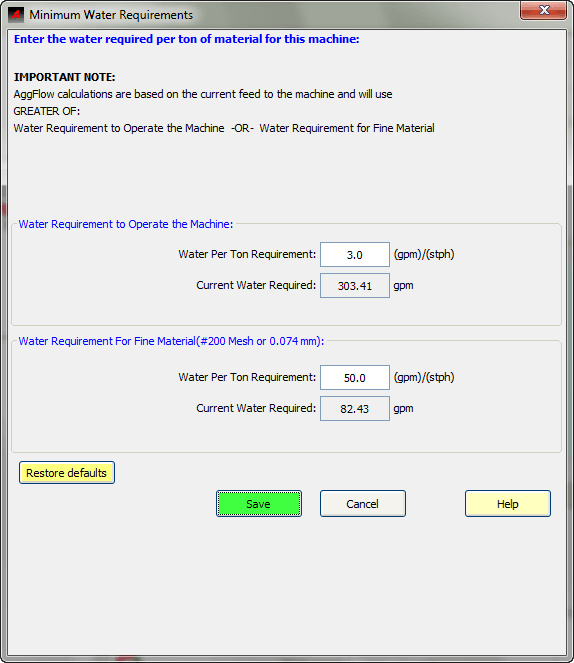
Clicking on this opens a window to determine the water required per ton based on the feed rate to the machine. If the water exceeds the manufacturer minimum for the machine, the minimum water required on the Adjust window will be set to the value calculated by this feature.
Sand Washing / Dewatering
Sand Washing/Dewatering equipment items consist of the following:
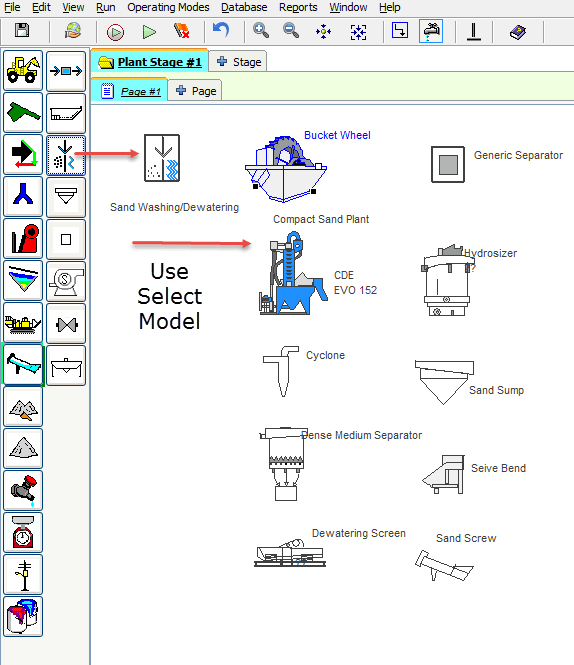
Bucket wheels, Cyclones, Separators, Hydrosizers, Dewatering Screens, Sand Sumps, Sieve Bends, and Sand Screws.
Sand washing and dewatering equipment is used to process fine materials typically less than 0.25" (6.35 mm) that includes passing 200 mesh (75 micron).
When washing or separating, this equipment uses hydraulic separation and large amounts of water to separate 200 mesh material or coarser from the product. Therefore, the relative buoyancy of different grain particles and their setting rates under specific conditions of water flow and turbulence are critical factors in the AggFlow DM calculations.
When dewatering, the equipment uses a mechanical action to separate the product from excess water.
This equipment operates using similar inputs in the setup. Material that enters the equipment will be divided into 2 flows, being a product and an overflow. As material passes through the equipment, the flow separation is determined by the split point settings which are related to the amount of water in the feed and added, and the water retained in the product.
Sand screws are limited in the amount of material smaller than the #50 (0.297 mm) that can be raked up the incline. As spiral speed increases, more turbulence in the weir reduces the settling rate of the fines and the ability of the sand screw to move those fines up the incline.
Sand Washing / Dewatering Options
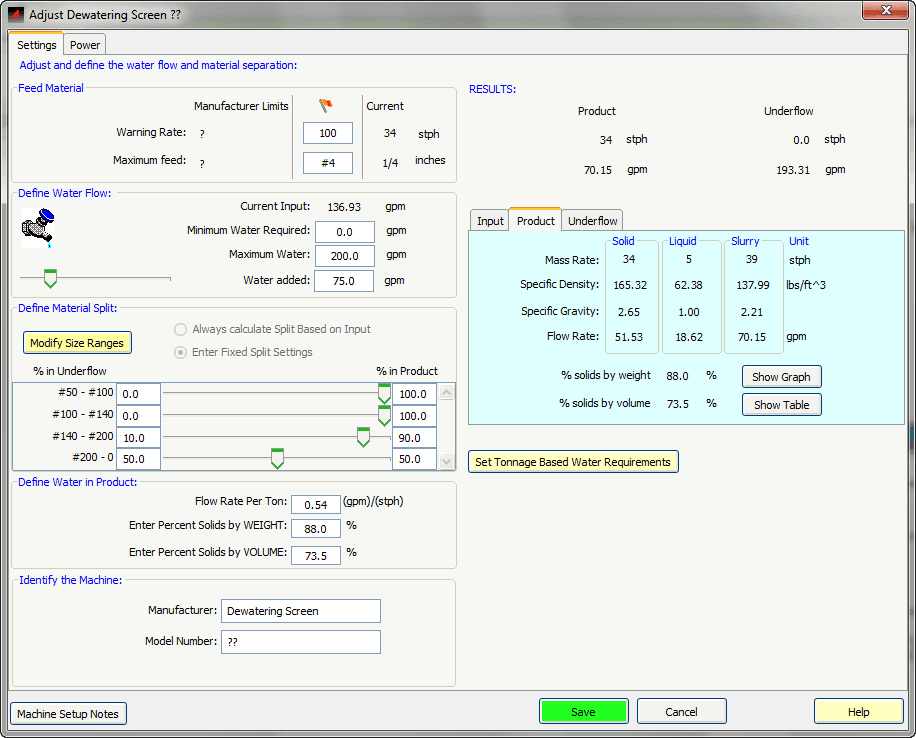
Sand Washing/ Dewatering equipment is set up from the Adjust Setup panel. The panel is organized with different sections as follows:
Feed material
Shows the manufacturer limits for the equipment if available. The red flag limits can be set or modified.
Define Water Flow
Depending on the equipment selected, manufacturer limits will be shown. If the equipment is generic or manufacturer limits are not available, the water flow limits can be set for the equipment. Water can be added to the equipment in define water flow, and for sand screws the split can be automatically calculated by changing the water flow.
Define Material Split
Material split is adjusted for the equipment by setting the % in overflow. For Sand Screws, manufacturer split based on the water flow can be calculated by selecting Always calculate split based on input.
Define water in Product
Changing one of the inputs will recalculate the others.
Results
Based on the settings, results will be automatically calculated using the feed results from the latest run.
To set up the equipment, follow these steps
- Select the equipment on the worksheet (it will turn blue).
- Double click the equipment or right-click and select
Adjust Setup. - Set the water flow, material split points and water in product for the equipment
- Review the data available on the Input, Output and Overflow tabs
- Use the Power tab to record and track details of the machine.
Sand Screw Settings
Spiral Speed
Adjust the spiral speed of the sand screw by moving the slider or entering a value. The corresponding Spiral RPM is calculated based on the speed. Modifying this automatically adjusts the raking capacity.
Raking Capacity
Maximum %: Displaces the maximum percent passing #50 mesh (0.297 mm) that the screw can take at the current spiral speed.Current Material Passing %: Displays the percentage of incoming material that is passing #50 mesh.
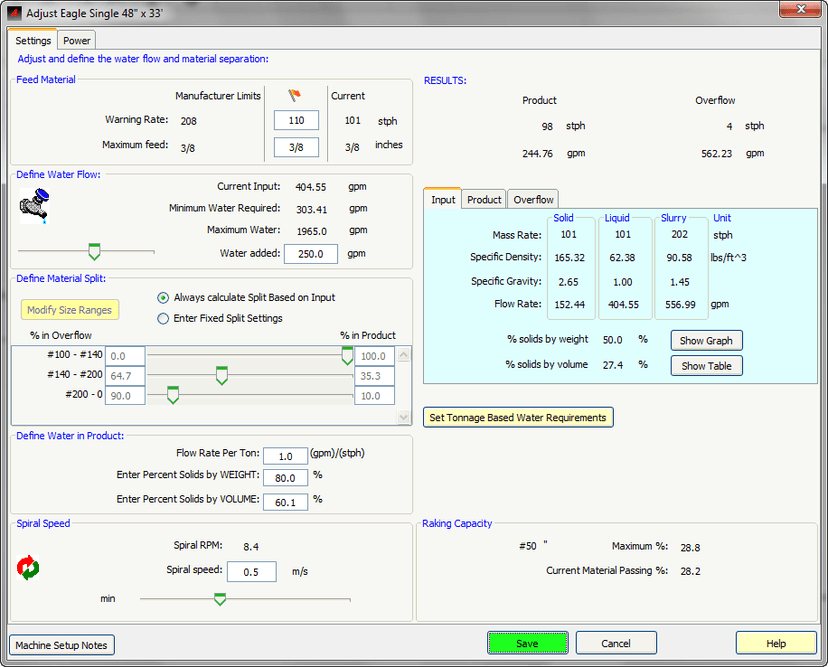
To operate a sand screw properly, the Current % value must be less than the Max % value.
Tonnage Based Water Requirements
To set water requirements based on feed, click on the Set Tonnage Based Water Requirements, enter the values and save, this will modify the minimum water required for the machine to operate.
Water Requirement to Operate the Machine
Specifies the amount of water required for each ton of material input.
Water Requirement for Fine Material
Specifies the amount of water required for each ton of material input that is smaller than #200 (0.074 mm).
Classification Equipment
Classification equipment (Classifying tanks) is used to separate fine material down to 200 mesh (use Log washers and coarse screws to separate more coarse materials).
The classifier process is based upon the settling rates of different-sized material as it enters the classifying tank. The tank receives slurry from upstream and separates it into two products: Product A (one specification) and Product B (a different specification). Whatever material remains after the two products becomes waste or becomes overflow depending on the overflow split point selected.
AggFlow DM calculations assume classifying tanks operate 100% efficiently at all separation points - making the maximum amount of Product A and Product B while minimizing waste.
Install Classifying tank
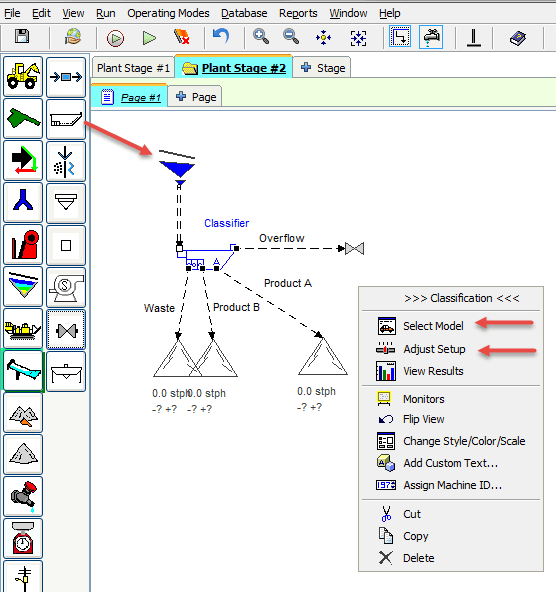
- Select the
Wash Equipmentcategory and place a classifying tank on the worksheet. - Right-click and select the classifier make/model.
- Connect the material flow to the classifying tank.
- Convert flow streams to slurry pipes.
Adjust Classifying Tank
Water Added
Controls the amount of water. Incoming water is the water in the material feed, Added water is additional water that will be added to the water balance, re-circulating water is water recirculated in the tank that is not added to the water balance, total water is the water the sum of these, and required minimum is the manufacture recommendation.
Minimum water requirement can be user set using the Set Minimum Water Requirement button. When the simulation is run the warning will be based on this setting.
Product
Divided by tabs for incoming material flow, product A and B, Waste being excess material, and tank overflow. When the simulation is run, the incoming flow is available to perform calculations. Each tab will show the percentage of material that is in each flow stream based on Mass Rate. Recalculate will update the values. Product tabs are used to view calculations and specifications.
Graph
Located below the product tabs and is shown for the product tab selected. The graph will include the specification upper and lower limits for Product A and B.
Specification Definition
Specifications need to be selected for products A and B. For input, waste and overflow tabs, the gradations and Tph will be shown for the calculated result. Specifications can be entered directly on the page by changing the numbers in the min-max column, or a new user specification can be created and inserted using the Insert Specification button to select, review and modify specifications. When the specification is changed by changing the values in the min-max columns, a user defined specification is created in the version database. See Database Menu Specifications.
Operation of the classifier can also be controlled by setting the Maximum % Retained, Priority and FM limits for product A and B.
Overflow
Selecting the overflow tab will allow adjustment of the % of product below the split point to be added to the waste product stream. To adjust the split point requires adjustment of the water flow into the tank.
Recalculate
Will refresh the calculation based on the input feed gradation from the simulation. If the input feed gradation is changed the simulation will need to be run. The numbers in the tab will turn red if a setting is changed to show that a recalculation is required.
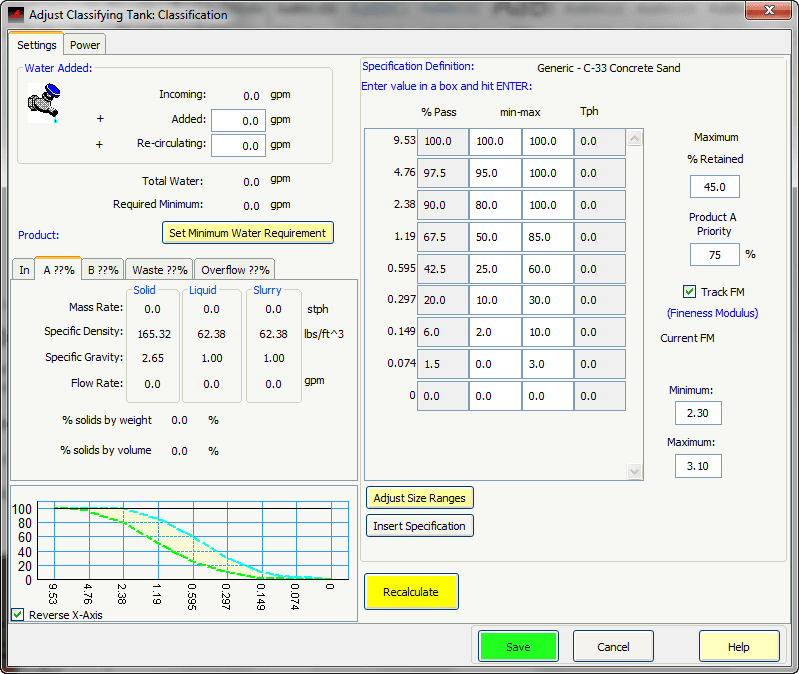
Follow these steps to set up the classifying tank.
-
Select the classifying tank, right-click and choose
Adjust Setupfrom the short-cut menu. -
Adjust water rates as needed. Use the
Set Minimum Water Requirementbutton to set the water required per ton of material for this machine. -
Select the tabs to review and adjust settings:
-
Product A: Define the specification and other options for product A in the table at right.
-
Product B: Define the specification and other options for product B in the table at right.
-
Waste: Review solid, liquid and slurry rates in the waste stream.
It is important to review the waste stream output for material sizes that are missing (for example has a TPH of 0 or 0.1). AggFlow DM calculates the material mix to meet the defined specification. By making adjustments upstream to create more of the missing material sizes, it is possible to increase the total amount of product and stay within specification. By refining the plant settings upstream to make more of the missing sizes, less material will be put into the waste stream when it is separated by the classifier.
- Overflow: Adjust the Split Point as desired and review solid, liquid and slurry rates in the overflow stream. The split point is controlled by the amount of water coming into the tank, the amount of water added to the classifying tank, and the amount of water recirculated. As you modify the amount of water added and recirculated, the overflow results are automatically updated. Use the Recalculate button to see the effect of changing the water amounts on products A and B.
-
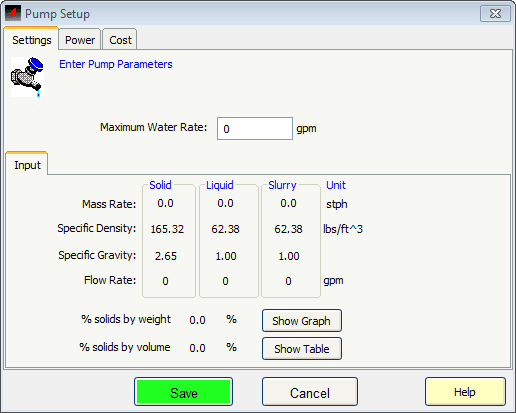
Slurry Pump
Slurry pumps are used to indicate where pumps are located in the plant operation and to track water transfer as well as power and cost usage.
To Install and Adjust Slurry Pumps
- Select
Slurry Pumpfrom the Wash category and place it on the worksheet. - Right-click and select
Adjust Slurry Pump. - Make the appropriate Adjustments in the
Pump Setupwindow including:- Indicate the maximum water Rate for the pump.
- Set the power to track power using electrical sources.
- Based on the operating parameters of the plant AggFlow will calculate the theoretical Solid, Liquid and Slurry rates flowing through the pump.
- View tables or graphs of the % Solids by Weight and % Solids by Volume calculations as desired.
Water Treatment / Recycling
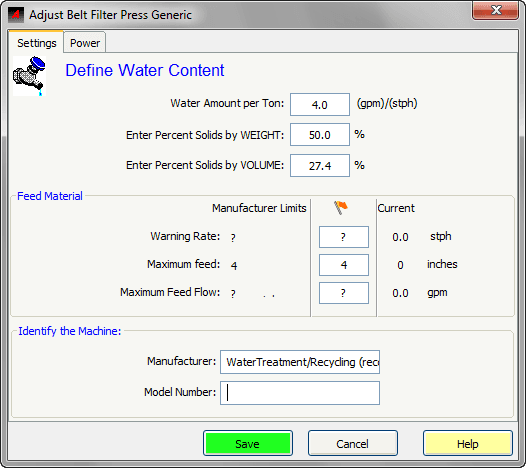
Water treatment and recycling equipment is used to separate clean water from slurry and pipe it back to a water source. The remaining dry material can be used as desired. This equipment includes belt filter press, retention ponds, silt thickener, and plate frame press.
This equipment receives material from a flow line, and separates the water from the material in the feed. Clean water can be circulated to clean water equipment, and the material can be directed to other equipment, inventory or end products. The water in the material can be set by the user.
To select the equipment, place this equipment on the worksheet, then select the icon and right click and Select Model. Choose a model from the list and Install.
To Adjust Water Treatment/Recycling equipment
- Select the icon (it will turn blue). 2. Right-click and choose
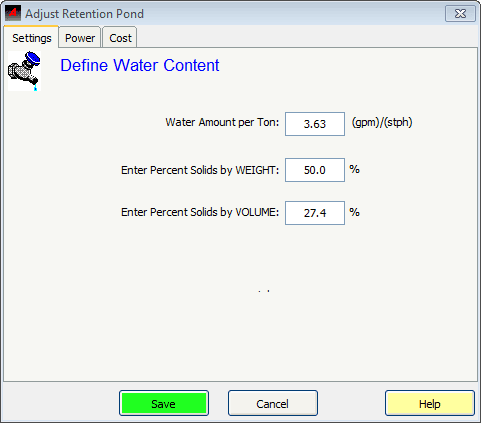
Adjust Setup. 3. Adjust the machine to accurately represent field results: 4. Define Water Content: Defines the water content of the discharged material. All three values are different representations of the same calculation. Changing one updates the other two: -Water Amount Per Ton: Represents the flow rate added to each ton of material. -Solids Weight %: Represents the Weight % of solids in the material (slurry). -Solids Volume %: Represents the Volume % of solids in the material (slurry). 5. Feed Material: View and set the warning rates for the installed equipment. Red Flag warning rates can be set for feed rate, material size, and slurry flow rate. 6. Identify the Machine: Generic machines can have the manufacture and model added to use with monitors.
Recovery Water
To Install and Adjust Retention Pond
- Select and install
Retention Pondon the worksheet. 2. Clean water from the retention pond can be resent to the operating plant. 3. Right-click and selectAdjust Setup. 4. Define: -Water Content-% Solids by Weight-% Solids by Volume5. AggFlow will use these entries to calculate water and material wash balances throughout the plant.